DSE and Manual Handling: Reduce Office Injuries Before Summer
Summer leave is brilliant for morale, but it can test small teams. When half the office is away, small aches, clunky setups and ad hoc lifting quickly turn into lost days and rushed cover. The good news is that a few DSE and manual handling quick wins now can cut discomfort and keep work flowing while colleagues take a well-earned break.
This post gives office-based SMEs and hybrid teams a simple, practical plan. You will see who counts as a DSE user, what employers must do, and how to fine tune set-ups in minutes. We will also cover everyday manual handling for non-warehouse teams, including when to say no to unsafe lifts. Finally, we will show how tutor-led e-learning and simple self-assessments create a clean audit trail and an easy onboarding rhythm for new starters and returners.
Who is a DSE user and what are your duties?
In UK guidance, a Display Screen Equipment (DSE) user is anyone who regularly uses a computer, laptop, tablet or similar screen for continuous or near-continuous spells of an hour or more per day. That includes office staff, hybrid workers, hot-deskers and people on shared devices in reception or meeting rooms.
Employer duties typically include:
- Identify DSE users and assess risks to their health.
- Take practical steps to reduce those risks, for example adjustments, equipment and work routine changes.
- Provide information and training on safe use.
- Plan work to include breaks or changes of activity.
- Make sure home-working arrangements are assessed to a sensible, proportionate standard.
In short, if someone does an hour or more most days, they are very likely a DSE user. Treat assessments as a living process, not a one-off form.
Quick wins for workstation setup, breaks and home-working
Small tweaks usually deliver the biggest gains. Aim for neutral joints, easy reach and regular micro-movements.
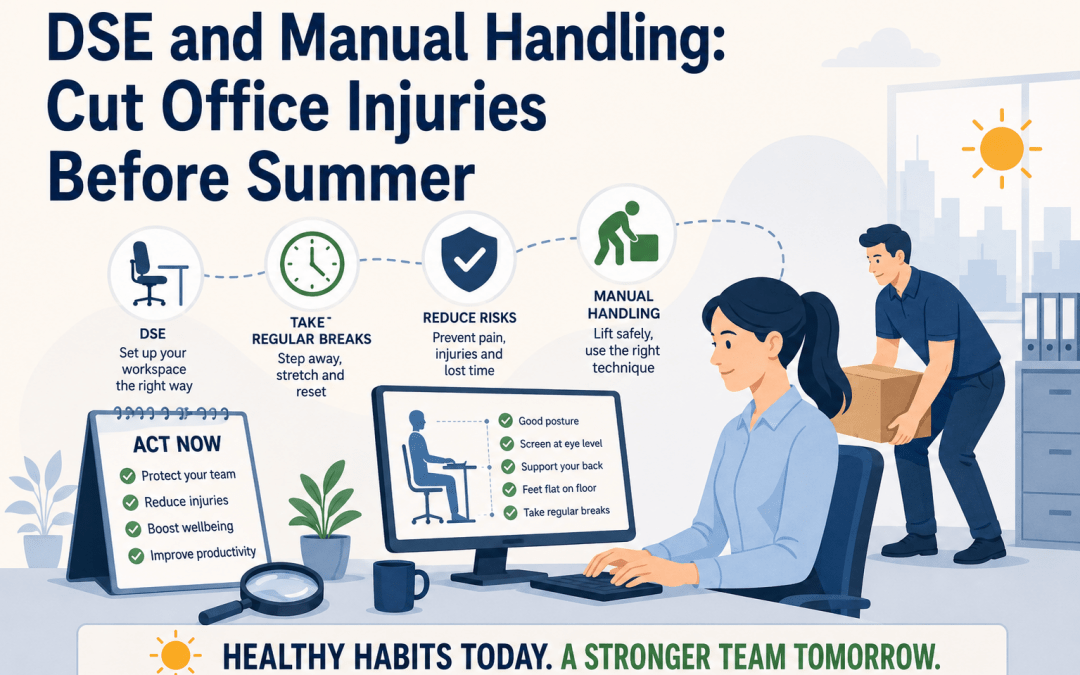
- Chair and posture: Sit with hips slightly higher than knees, feet flat, and back supported. Adjust lumbar support so you feel contact on your lower back. If feet dangle, add a footrest.
- Screen height and distance: Top of the screen roughly at eye level; an arm’s length away so you can read without leaning in. For laptops, use a stand and separate keyboard and mouse.
- Keyboard and mouse: Keep elbows close to your sides and wrists straight. Place the mouse next to the keyboard at the same height. Swap mousing sides or try shortcuts to mix muscle use.
- Layout: Put frequently used items within forearm reach. Raise the screen rather than hunching to it. Use document holders if you copy type.
- Breaks and micro-movements: Follow the 20-8-2 idea each half hour where practical, as a prompt to vary posture. For example, 20 minutes sitting, 8 minutes standing, 2 minutes moving. If a sit-stand desk is not available, stand for calls, walk to ask quick questions, or stretch shoulders and hips between tasks.
- Home-working: Replicate office ergonomics at home. Perch on a kitchen stool only as a last resort. Use a separate keyboard and mouse, and lift the laptop to eye level with books if needed. Avoid working from a sofa for long spells.
Encourage people to self-correct in the moment. A two-minute nudge beats a two-month niggle.

Manual handling for office teams, trolleys and everyday lifts
Office staff lift more than they realise: archive boxes, water bottles, IT kit, stationery deliveries and meeting furniture. Sprains and strains are common when people twist, rush or overreach.
Practical steps:
- Plan the lift: Check weight, shape and route. Remove trip hazards. Share the load or break it down if possible.
- Posture and technique: Stand close, feet hip-width, one foot slightly forward. Engage your core, keep the back’s natural curve, and lift with your legs while keeping the load close. Avoid twisting, pivot with your feet.
- Use aids: Choose a trolley for all but the lightest items. For stairs, consider two-person carries or break down loads. Do not carry large items that block your view.
- Set local rules: Cap weights for single-person lifts, store heavy items between knee and hip height, and make trolleys easy to grab near delivery points.
You also have the right to refuse unsafe tasks. If a load is too heavy, awkward or the route is unsafe, stop and escalate to a manager so the task can be controlled, shared or aided.
Create an audit trail with tutor-led e-learning and self-assessments
Quick, tutor-led video modules help teams absorb core principles fast. Pair short DSE and Manual Handling e-learning with simple self-assessments and you will have:
- Clear evidence that staff received training.
- Module tests with scores and multiple attempts where provided, supporting competence records.
- A repeatable process for new starters, temporary staff and returners.
Safeguard E-Learning provides online, tutor-led health and safety courses that include module-based tests and the option to review content. The first module of every course is available as a free trial so managers can preview fit and style before rollout.
If you are building a broader safety matrix alongside DSE and manual handling, you can add complementary topics such as health and safety training or role-specific fire content like fire warden training. For teams planning wider readiness over the summer, you can also review our emergency first aid at work course page to understand how online learning supports, not replaces, your practical first aid provision.
Rolling onboarding for new starters and returners
Summer brings temporary staff, interns and people returning from leave. Keep your approach light but consistent:
- Pre-joiner links: Send the DSE Awareness module preview and a simple DSE self-assessment to complete on day one.
- First-week checklist: Confirm workstation adjustments, issue a keyboard and mouse to laptop users, and show where trolleys are kept. Book the Manual Handling awareness module early.
- Remote or hybrid rhythm: Add a home-working DSE check and a short video on setting up a laptop stand. Ask managers to verify a photo of the setup where helpful.
- Refreshers and changes: Repeat training when equipment, layout or roles change. Encourage staff to request reviews after discomfort, moves or new tasks.
A steady drip of micro-actions keeps risk low without large time blocks, which is perfect in the run-up to the holiday peak.
Assessing Display Screen Equipment - E-Learning - On-Line Fire and Health & Safety Courses
Manual Handling - E-Learning - On-Line Fire and Health & Safety Courses
FAQs
- Who is legally required to do DSE training? Employers must protect DSE users, defined as people who use screens for an hour or more most days. Those users should receive information and training, plus a suitable DSE assessment and adjustments.
- Do office staff need manual handling training? Yes, if their work includes lifting, carrying or moving loads such as boxes, water bottles or equipment. Awareness training helps staff recognise risks and use safe techniques and aids.
- What are the 5 Ps of manual handling? Many organisations teach a simple checklist, often stated as Plan, Path, Posture, Power and Put down. Plan the task, check the path, use good posture, lift with leg power while keeping the load close, and put down with control.
- Can I refuse to lift heavy objects at work? You should not carry out tasks you believe are unsafe. Raise the concern with your manager so controls can be put in place, such as team lifting or using a trolley.
- Can manual handling training be done online? Yes. Awareness can be delivered online with tutor-led modules and tests. Where job roles involve significant handling, practical training may also be required.
- How long does a manual handling certificate last? There is no single legal expiry. Many employers refresh annually or every 2 to 3 years, or sooner when tasks, equipment or risks change.
Take your next step today
Tackle the simple wins now so your team heads into summer feeling comfortable and confident. Enrol staff on DSE Awareness or Assessing DSE and our Manual Handling online course, use the free first module to preview, and keep the momentum with short self-assessments and quick adjustments. If you are building a wider programme, browse our online training for health and safety to round out your compliance plan.
Need guidance on rollout or record-keeping? Contact Safeguard E-Learning on 0333 366 1015 or info@safeguardconsultancy.co.uk.
Training is only one part of creating a safe and compliant workplace. Alongside Safeguard E-Learning, our sister company, Safeguard Consultancy, provides professional fire safety consultancy services across the UK.
Services include Fire Risk Assessments, Fire Door Surveys, Fire Compartmentation Surveys, Fire Strategies, Passive Fire Protection advice and wider fire safety compliance support. If your organisation requires both staff training and expert fire safety guidance, our team can help you build a complete compliance programme.
Visit Safeguard Consultancy to learn more about our fire safety services and how we support businesses, schools, housing providers and healthcare organisations nationwide.
Safeguard Consultancy - Fire Risk & Passive Fire Consultancy